See what your UPS is doing from up to 1,000 feet away.
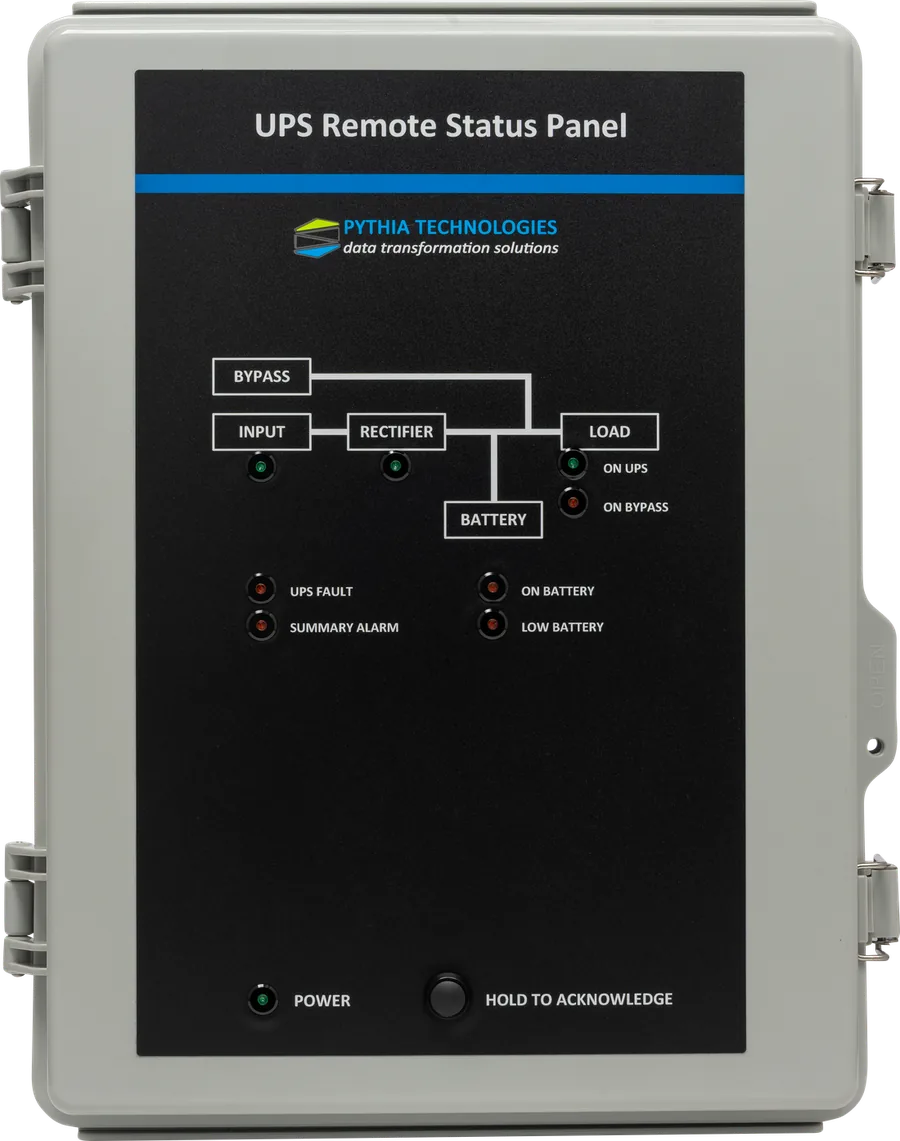
The UPS Remote Status Panel puts a UPS's six key conditions on the wall where people work: a NOC, a help desk or an operations room. Each condition has its own LED, an alarm sounds when something changes, and every state is published over Modbus for your BMS.
Six conditions that tell you whether the load is safe.
A UPS in a back room only signals locally. The panel reads six voltage-free contacts from the UPS and shows each one on the front, so the people who need to react see a power event as it happens.
On UPS
The UPS is supplying conditioned power to the load. Normal operation.
On Bypass
The load has moved to raw utility power, usually for maintenance or after an internal fault.
On Battery
Utility power has failed and the batteries are carrying the load.
Low Battery
Runtime is running short. The load is at risk if power doesn't return.
UPS Fault
The UPS has reported an internal fault that needs attention.
Summary Alarm
The UPS's general alarm, often a roll-up of any active condition.
A power failure, from the panel's point of view.
Works with almost any UPS that has dry-contact outputs or a relay card, from a rack-mount Liebert GXT5 to a three-phase system protecting a data hall.
Put it in a NOC, a help desk or an operations room, up to 1,000 feet from the UPS.
Simple to install, impossible to miss.
Heard as well as seen
An audible alarm sounds when a condition changes. Hold to acknowledge silences it; the LED stays lit while the condition lasts.
One contact for everything
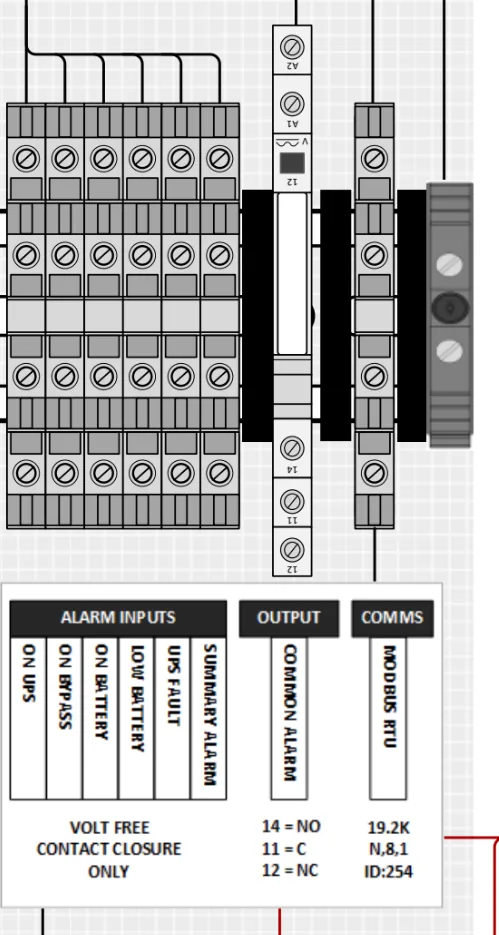
The common alarm relay (NO or NC, 6 A) drives a beacon, a horn or an input on your building annunciator.
On the network
All six conditions are published over Modbus RTU and Modbus/TCP. SNMP and BACnet/IP are available with an optional adapter.
No nuisance alarms
An alarm delay of 0 to 60 seconds filters brief transfers, and the buzzer can be enabled or disabled.
Simple to wire
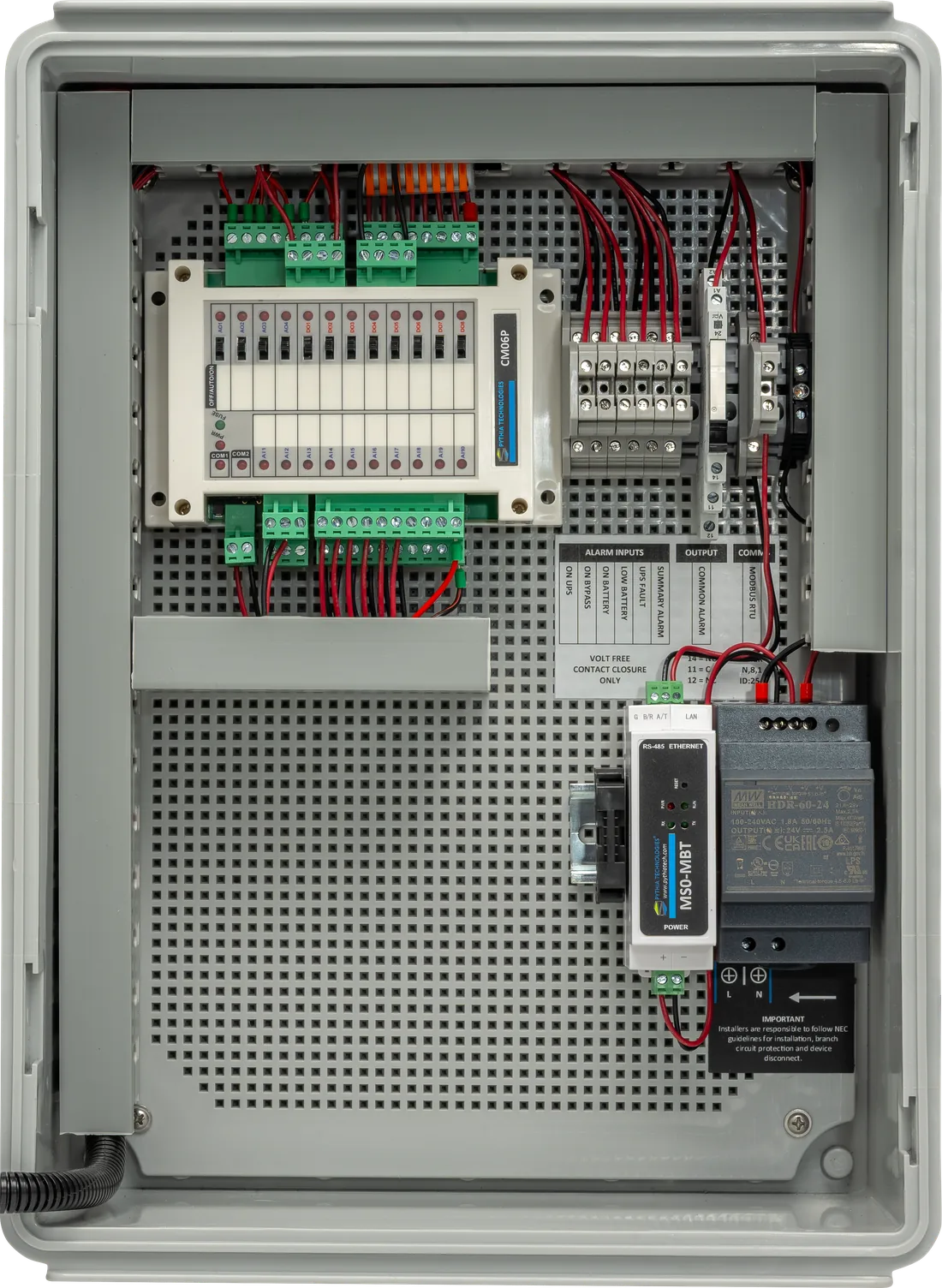
Each terminal is labeled with its condition. Match the UPS contact to the label; the panel does the mapping.
Test it any time
Hold the Acknowledge button for about five seconds: every LED lights and the buzzer sounds.
From a network closet to a data hall.
Closet UPS, status at the help desk
A Liebert GXT5 in an unmanned wiring closet. When utility power fails, On Battery lights and the buzzer sounds at the help desk, about 250 ft away.
A fleet of UPSs on the BMS
GXT5 units in closets across a campus. Each closet keeps a local panel for technicians, while the BMS polls every panel over Modbus/TCP.
Data hall UPS with a relay card
A three-phase UPS's relay card is wired to the labeled terminals. Any active condition closes the common alarm relay and joins the facility's critical alarm chain.
UPS events in the Pythia DM
The DM polls the panel over Modbus, time-stamps every transfer and fault, and trends them. With the AI Connector, an assistant can answer from that history.
Every condition, on the network.
| Condition | Register | Value |
|---|---|---|
| On UPS | 41001 | 0 off, 1 on |
| On Bypass | 41002 | 0 off, 1 on |
| On Battery | 41003 | 0 off, 1 on |
| Low Battery | 41004 | 0 off, 1 on |
| UPS Fault | 41005 | 0 off, 1 on |
| Summary Alarm | 41006 | 0 off, 1 on |
| Alarm delay | 44001 | 0–60 s, read/write |
The full register and BACnet object lists are in the product guide.
UPS Remote Status Panel (CS0-RSP-UPS).
| Inputs and outputs | |
|---|---|
| Alarm inputs | 6 voltage-free dry contacts: On UPS, On Bypass, On Battery, Low Battery, UPS Fault, Summary Alarm |
| Distance | Up to 1,000 ft from the UPS. Belden 6300UE recommended |
| Common alarm relay | 1, Normally Open or Normally Closed. 6 A at 250 VAC, 6 A at 30 VDC. Class 2 circuits only |
| Local indication | LED per condition on a UPS one-line mimic, power LED, audible alarm, hold-to-acknowledge button, LED test mode |
| Communications | |
| Standard | Modbus RTU (default address 254, 19200, 8-N-1) and Modbus/TCP (default 192.168.0.7) |
| Optional | SNMP and BACnet/IP adapter |
| Configuration | Alarm delay 0–60 s and buzzer enable, set with the free Pythia Modbus tool over the network or a USB-485 adapter |
| Physical | |
| Enclosure | Wall-mount ABS, IP67 rated, UL94-V0. Meets or exceeds the UL 508A Open Industrial Control Panel standard |
| Power | 120 VAC standard. 24 VAC and 48 VDC optional |
| Environment | −30 to 45 °C (−22 to 113 °F) inside the enclosure. 5 to 95% RH, non-condensing |
| Recommended wiring | Belden 6300UE for dry contacts, Belden 6300FE for Modbus RTU, CAT5e or better for Ethernet |
Specifications are subject to change. Call for alternative assemblies and options.
From a status light to a full UPS history.
The Pythia DM polls the panel over Modbus and gives every UPS event an alarm, a notification, a time stamp and a trend. With the DM AI Connector, Claude, ChatGPT or any MCP assistant can answer from that data.
UPS Remote Status Panel questions, answered.
What is the UPS Remote Status Panel (CS0-RSP-UPS)?
The UPS Remote Status Panel is a wall-mount panel that shows a UPS's six key conditions on LEDs: On UPS, On Bypass, On Battery, Low Battery, UPS Fault and Summary Alarm. It sounds an audible alarm when a condition changes, has a common alarm relay output, and publishes every condition over Modbus.
How far from the UPS can the panel be installed?
Up to 1,000 feet, on voltage-free dry-contact wiring. Belden 6300UE is recommended.
Which UPS models work with the CS0-RSP-UPS?
Almost any UPS that provides dry-contact outputs or a programmable relay card, from a rack-mount Vertiv Liebert GXT5 to a large three-phase UPS with a relay card. Each condition is wired to the panel terminal labeled with its name.
Does the panel connect to a BMS?
Yes. All six conditions are published over Modbus RTU and Modbus/TCP. SNMP and BACnet/IP are available with an optional adapter. The common alarm relay can also drive an input on a building annunciator.
Can I stop nuisance alarms from brief UPS transfers?
Yes. A configurable alarm delay of 0 to 60 seconds filters brief transfers, and the buzzer can be enabled or disabled. Both are set with the free Pythia Modbus tool.
How do I test the panel?
Hold the Acknowledge button for about five seconds to enter LED test mode. Every LED lights and the buzzer sounds.
What does the common alarm relay do?
It gives other systems a single UPS-in-alarm contact. It supports Normally Open or Normally Closed wiring, rated 6 A at 250 VAC or 30 VDC, for Class 2 circuits.
Can the panel's UPS data go to the Pythia DM or an AI assistant?
Yes. The Pythia DM can poll the panel over Modbus, giving every UPS event an alarm, a notification, a time stamp and a trend. With the DM AI Connector, an AI assistant can answer from that data.
Call for pricing.
Contact us for a demo or pricing, and we'll confirm the right configuration for your site.